NewsBreak: Local News & Alerts
- 4.6
- Rating
- 50.00M
- Installs
- Free
- Price

 Analysis by App-foxy
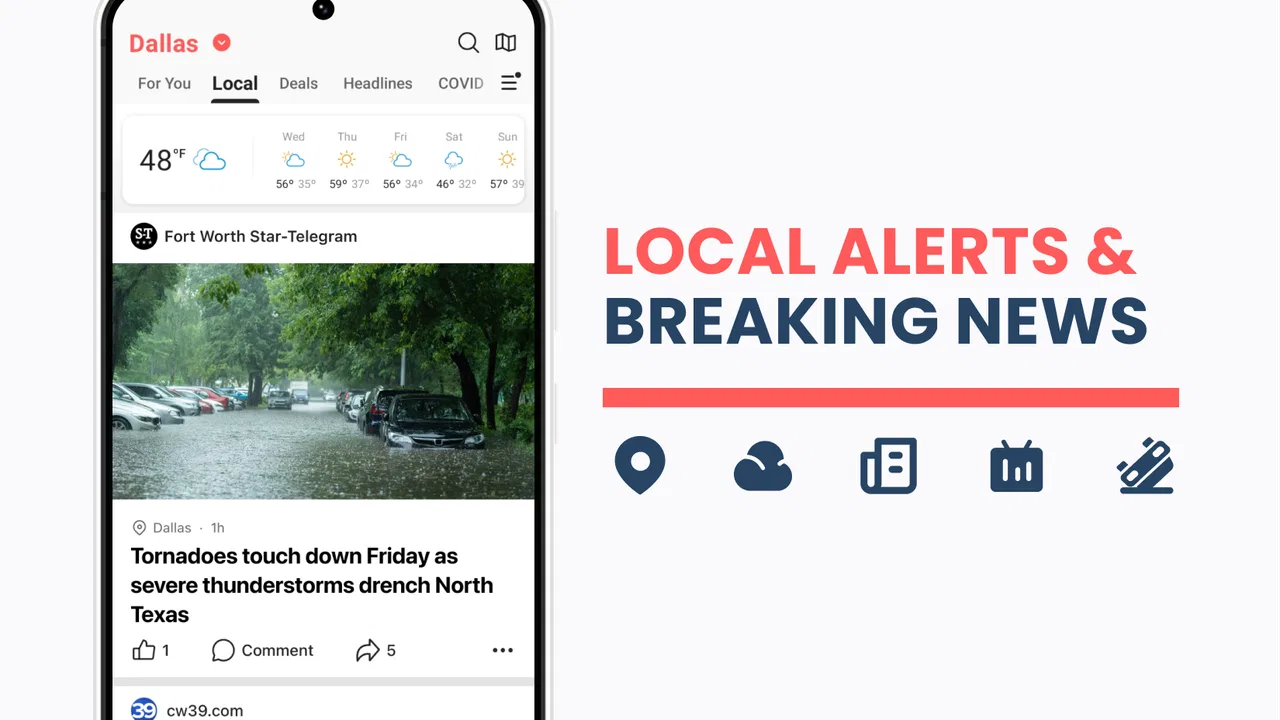
I installed NewsBreak to see whether it could become a useful part of my daily news routine rather than just another app sending attention-grabbing alerts. It is a free News & Magazines app from Particle Media Inc., focused on local headlines and neighborhood-oriented updates. My first impression was that its value depends less on replacing every news source and more on helping you notice what is happening close to home.
That distinction matters. National news apps are usually better when I want a broad overview, while a newspaper’s own app may offer deeper reporting from one newsroom. This app sits between those habits: it gives me a convenient stream of local and wider stories in one place, with alerts that can bring important headlines to my attention before I deliberately open a news app. I found that approach useful, but only when I treated notifications as a starting point rather than a complete picture.
How NewsBreak feels during everyday use
I find the everyday experience most useful when I treat NewsBreak as a quick local-news check, not a feed I need to keep open. A practical way to judge whether it fits is to notice which headlines actually help me plan or understand my day, then use that as a guide for how often I return. That makes the app’s convenience easier to balance against the attention a steady stream of news can demand.
You May Also Like

 AccuWeather: Weather Radar
AccuWeather Review: A Quick, Clear Forecast for Everyday Decisions
For everyday plans, the best forecast is the one you can understand quickly. AccuWeather makes rain timing, radar, and local conditions easy to act on, with a few trade-offs.

 Hill Climb Racing
Why Hill Climb Racing Still Turns Crashes Into One More Run
A tiny car, a bumpy hill and one more upgrade: Hill Climb Racing keeps resurfacing because its simple chaos makes every near-miss feel personal.

 AliExpress - Shopping App
AliExpress Makes Global Shopping Feel Personal, but Shoppers Bear the Risk
AliExpress turns a global marketplace into a pocket-sized discovery engine. Its reach is useful, its shopping loop compelling, and its trade-offs easy to miss.

 Lords Mobile: Kingdom Wars
Lords Mobile Is a Kingdom-Building Routine, Not a Quick Match
A case-by-case verdict on the building, battles, device demands, and social commitments that make Lords Mobile rewarding for some players and exhausting for others.

 PDF Scanner app - TapScanner
TapScanner Makes Paperwork Easier to Capture, Check, and Share
TapScanner makes scanning with a phone feel less like a rescue operation and more like a dependable step in getting work done. Its capture tools are useful, though not flawless.

 Block Blast!
Block Blast! Shows How Much a Puzzle Game Can Leave Out
A quiet grid game shows why puzzle players increasingly value instant clarity, repeatable skill and low-pressure play—and where the genre still needs to catch up.
More From Our News Desk
View All News


Quick access is the main attraction
The app’s strongest performance quality is its immediacy. When I have a short break, I can open it and quickly scan headlines instead of visiting several local sites one by one. That makes it a natural fit for a morning check, a commute when I am not driving, or a few minutes before an appointment. The experience is built around reducing the effort needed to discover nearby news.
I would not describe that convenience as a substitute for careful reading. A headline feed is excellent for finding stories, but I still want to open the full article when a subject affects my plans, finances, safety, or community. My practical tip is to use the first pass for discovery: save your attention for the two or three items that genuinely matter, rather than trying to read every headline.
Alerts can make the app feel especially fast because they move news into my normal phone routine. That is also where restraint becomes important. If I allow every notification to interrupt me, the benefit quickly turns into noise. I recommend keeping alerts for the kinds of local developments you would actually act on and checking the feed manually for everything else.
What happens when I use it heavily
Longer sessions reveal a trade-off. A local news feed can keep presenting fresh subjects, but the more I scroll, the easier it becomes to consume headlines without forming a clear understanding of any one story. I get more value when I use a simple workflow: scan, choose, read, then leave. That keeps the app from becoming an endless background habit.
For a busy household, the practical use case is easy to imagine. I might check the app before leaving for work to see whether a nearby event, road issue, weather development, or community story could affect the day. Later, I can return to read more about the items that are relevant to my neighborhood. The app is helpful here because it shortens the search process, but I would still verify important details through the original publisher or an official local source.
Heavy use also makes the difference between local awareness and information overload more obvious. If I am researching a complicated public issue, I prefer opening several detailed reports and comparing them. NewsBreak is better at surfacing the issue than at being my only research tool. That is a meaningful limitation, not a defect: aggregation offers breadth, while dedicated reporting often offers more context.
Stability and recovering after interruptions
In normal use, I expect a news app to let me move in and out of articles without making me rebuild my routine each time. My experience with this app was most comfortable when I used it in short sessions, because that matches its purpose. If an interruption breaks my reading, I simply return to the feed and continue choosing stories instead of treating the app like a long-form reading platform.
That recovery pattern is useful on a phone. News reading often happens between other tasks, so I do not want to reserve a long uninterrupted block for it. Still, anyone who expects a perfect record of every unfinished article may find the experience less satisfying than a dedicated reading service. I would approach it as a live news dashboard, not as a personal archive.
Reliability also depends on separating the app’s role from the reliability of individual reports. A smooth interface cannot guarantee that every headline gives enough context. When something is urgent or sensitive, I look for the original article and, where appropriate, an official announcement. This habit is especially important with local incidents, where early reports can change as more information becomes available.
Device age and practical constraints
The app supports Android devices running version 8.0 or later, which makes it accessible to many phones still in everyday use. That broad compatibility is welcome for families or users who do not replace devices frequently. On older hardware, I would keep expectations realistic: a modern news feed may feel less comfortable if the phone already struggles with many demanding apps, limited free storage, or an overloaded background workload.
I did not find a reason to install it on a tablet solely for extended reading. Its clearest use is on a phone, where local alerts and quick checks make sense. On a larger screen, I would personally prefer a newspaper or browser experience when I want to compare several articles side by side. The app’s advantage is not maximum reading space; it is convenience and immediacy.
Battery and data habits deserve attention even though they are easy to overlook. News alerts and frequent feed checks can become part of a phone’s daily activity. I would review the notification choices after installation and avoid opening the app repeatedly just because a new headline appears. A short, intentional check is more efficient than leaving it as a constant distraction.
Who will get the most from it?
I think the app is a good match for people who have moved to a new area, want a quick sense of neighborhood events, or prefer one starting point for local headlines. It can also suit readers who do not have a favorite local publication and want to discover what subjects are being discussed nearby. The free price makes trying it low-risk, although in-app purchases range from ten cents to thirteen dollars per item, so I would pay attention to any purchase prompt rather than assuming every part of the experience is cost-free.
It is less suitable for someone who wants one carefully edited newspaper with a consistent editorial voice. It is also not my first choice for deep investigative reading, specialist coverage, or a distraction-free reading list. In those situations, a trusted local newsroom, a public broadcaster, or a dedicated reading app may be a better fit.
Useful habits that improve the experience
My first recommendation is to decide what “local” means for you before settling into the app. A neighborhood, a workplace area, and a family member’s town may all matter, but they do not deserve equal attention every day. Keeping your focus narrow makes the feed more useful and reduces the chance that unrelated headlines dominate your routine.
Second, use alerts as prompts rather than conclusions. When a notification sounds important, open the story and look for the full context before sharing it or changing your plans. This is a small habit, but it prevents the speed of a notification from becoming the speed of your judgment.
Third, separate discovery from verification. I use the app to learn which subjects deserve attention, then I compare significant claims with the article’s source or an official channel. That workflow takes slightly longer than reading a headline and moving on, but it gives the app a more responsible role in my day.
Finally, I would periodically remove the app from my automatic checking cycle if it starts to feel intrusive. News should help me understand my surroundings, not occupy every quiet moment. The best setup is one where the app serves my schedule instead of controlling it.
Scale, maturity, and what that signals
NewsBreak has been available since June 17, 2016, and its current version is 25.52.0. Its average rating is 4.6 from around 610 thousand ratings, with over 147 thousand written reviews, and it has passed 50 million installs. Those figures suggest that the app has reached a large audience and has had time to develop beyond a brand-new experiment.
I see that scale as reassuring for someone choosing a mainstream local-news tool, but popularity does not remove the need for personal judgment. A large audience cannot tell me whether the mix of headlines suits my town or whether the alert style fits my temperament. I would install it, spend several days adjusting my habits, and then decide whether it improves my awareness enough to keep.
My performance verdict
My overall view is positive, with a clear boundary. NewsBreak is most effective when I need fast access to local headlines and a convenient way to notice stories I might otherwise miss. It feels designed for short, repeated visits, and that makes it practical on a phone. The experience becomes less convincing when I expect it to replace detailed local journalism, provide a perfectly quiet reading environment, or serve as my only source for important information.
For me, the best setup is simple: allow only useful alerts, scan the feed at chosen times, open the original reporting for serious subjects, and stop reading when I have learned what I needed. That approach preserves the app’s speed without letting it turn into an endless stream. Its real strength is fast local discovery, not complete news replacement.
The Teen content rating makes it more appropriate for older young readers than for small children, and I would still encourage parents to discuss how headlines and breaking reports should be evaluated. As a free app from Particle Media Inc., it is easy to try, and the large installed base means it is clearly a familiar choice in this category. I would recommend it to readers who want a broad local starting point, while pointing dedicated newspaper readers toward their preferred publication for depth.
In the end, I would keep it on my phone if local awareness were a daily priority. I would skip it if I already had a trusted, comprehensive local-news subscription and wanted fewer sources rather than more. For everyone in between, it offers a useful middle ground: quick, nearby news discovery with enough flexibility to become valuable, provided I remain selective about alerts and careful with important stories.
Trust begins with what I can judge
With a news app, I care about more than whether its feed is convenient. I also want to know what I am choosing to receive and how much authority I give a headline before I have read the reporting behind it. I treat NewsBreak as a discovery layer, not as a guarantee that every item is complete or equally useful. That distinction lets me benefit from a broad local feed without handing it the final word on a developing story.
I also avoid making assumptions about privacy or permissions based on an app’s subject matter. Before using any news service, I check the permission prompts and the device’s app settings, then allow only what makes sense for the way I plan to use it. If a permission is not necessary for my own routine, I do not grant it automatically. That is a practical check, not a claim about any particular data practice.
Keeping control of interruptions and choices
A helpful test is to leave alerts off or limited at first, then decide after a few days whether any particular kind of headline genuinely earns an interruption. This gives me a clearer sense of the app’s value than accepting every prompt during setup. I can also revisit notification controls in the phone settings if the pace becomes distracting, rather than feeling obliged to keep every alert enabled.
For a reader who wants to follow a town without constantly checking a screen, I would use the feed at a chosen time and treat alerts as optional exceptions. Someone who needs immediate updates for a specific local situation may prefer to check official channels directly, because a general news feed is not a substitute for a source responsible for issuing authoritative instructions. The useful choice depends on whether I want awareness or operational guidance.
How it fits beside other news habits
Compared with opening several newspaper apps, NewsBreak can save the effort of checking multiple places for a first overview. Compared with a single publisher’s app, it can feel less focused: the range of sources is useful for discovery, but it may not provide the continuity or editorial voice I get from following one newsroom closely. I would keep both approaches only if they serve different jobs—this app for finding leads, a trusted publication for reporting I want to follow in depth.
A realistic routine might be to glance at the local feed over breakfast, notice a community meeting or road disruption, and then seek the full report before changing plans or forwarding it to someone else. That quick second step is where the app becomes more valuable: I am not treating a headline as the whole story, but using it to identify what deserves a closer look. For readers who dislike having news mixed into a busy phone routine, though, a scheduled visit to a newspaper website may be calmer.
A measured recommendation
NewsBreak suits me best as a flexible local-news radar: useful when I want to spot nearby topics, less suitable when I need a single authoritative account or uninterrupted long-form reading. I would try it if I were settling into a new community or wanted a convenient overview, then keep only the alerts and habits that prove worthwhile. If you already know which local newsroom you trust and prefer a deliberate, edited experience, that publication may serve you better on its own.
FAQs for NewsBreak: Local News & Alerts
01What features does NewsBreak offer to enhance my news consumption?
NewsBreak offers a personalized news feed that curates articles based on your interests and location. It provides breaking news alerts, trending stories, and local updates. Users can customize their experience by following specific topics or sources, ensuring they receive the most relevant news. The app also supports community engagement by allowing comments and discussions.
02How does NewsBreak ensure the accuracy and reliability of its news content?
NewsBreak aggregates content from a wide range of reputable sources, including major news outlets and trusted local publishers. The app uses algorithms to filter out unreliable sources and prioritizes content from established media. Users can also flag any questionable articles, contributing to the app’s quality control and commitment to reliable information.
03Is NewsBreak free to use, or does it have any subscription fees?
NewsBreak is free to download and use, offering a comprehensive range of features without any subscription fees. There are no hidden costs, but the app does display ads to support its free model. Users can access all news articles, alerts, and features without any paywalls or premium content restrictions.
04Can I customize the notifications I receive from NewsBreak?
Yes, NewsBreak allows users to customize notifications according to their preferences. You can choose to receive alerts for breaking news, local updates, or specific topics of interest. The notification settings are flexible, allowing you to manage both the frequency and type of alerts received, ensuring you're only notified about the news that matters to you.
05How does NewsBreak handle user privacy and data security?
NewsBreak prioritizes user privacy and data security by implementing robust measures to protect personal information. The app collects minimal data required for functionality, such as location for local news updates. It complies with privacy regulations and offers clear privacy policies. Users can review and manage their data preferences within the app settings.
Pros
- Comprehensive local news coverage.
- Customizable news alerts.
- User-friendly interface.
- Offline reading available.
- Diverse news sources included.
Cons
- Frequent ads can be intrusive.
- Limited international news focus.
- Occasional app crashes reported.
- Requires account for full features.
- Some content may be repetitive.

NewsBreak: Local News & Alerts
Gallery